
pullpost
Save the photos and videos of an Instagram post as files, at the highest resolution Instagram serves, on your own server.
Docker Compose · PHP 8.3 + headless Chromium · English & Romanian · GPL-2.0-or-later
Screenshots
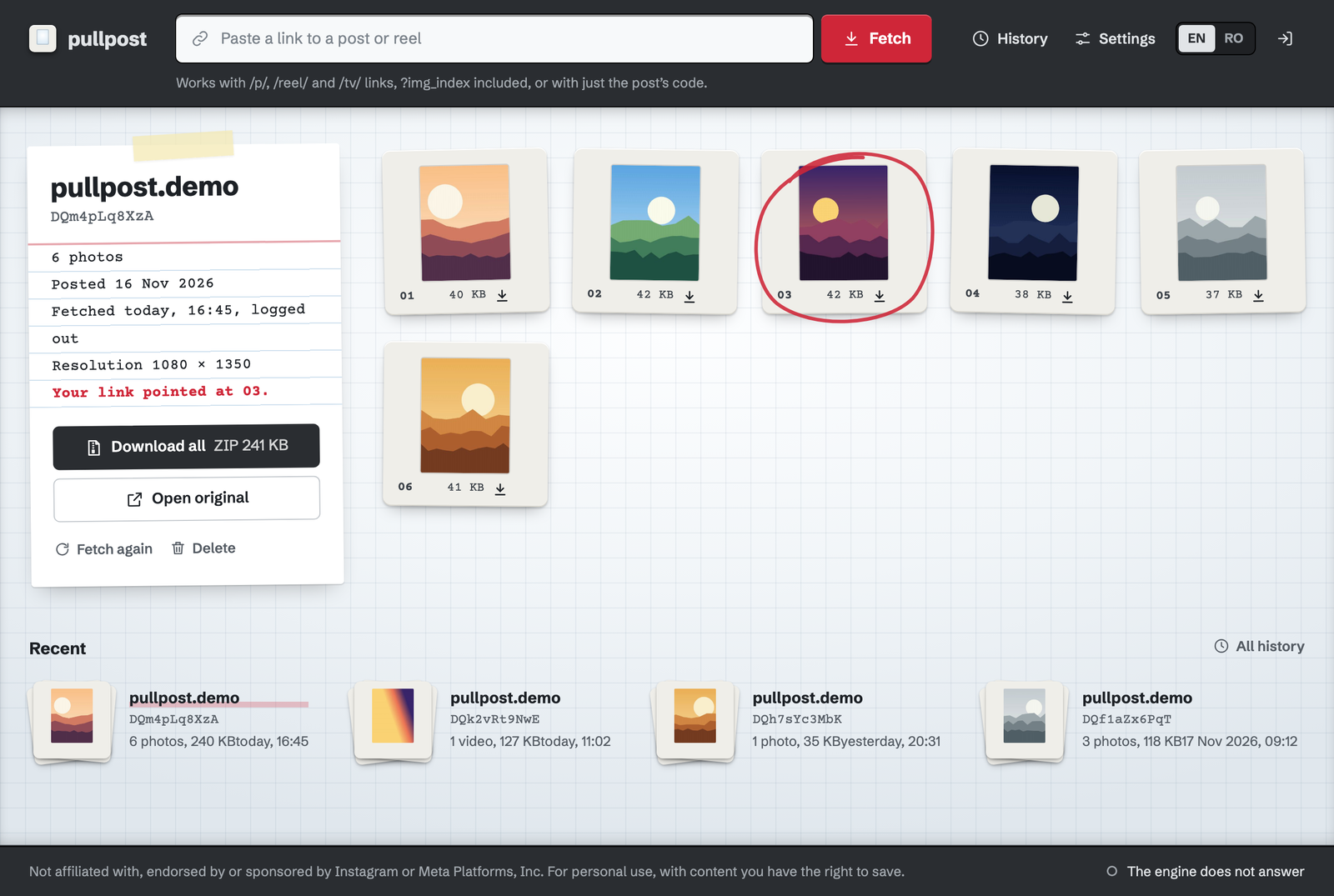
The light table: every file of the post as a slide, the one the link pointed at circled, the details and the ZIP on a typed card.
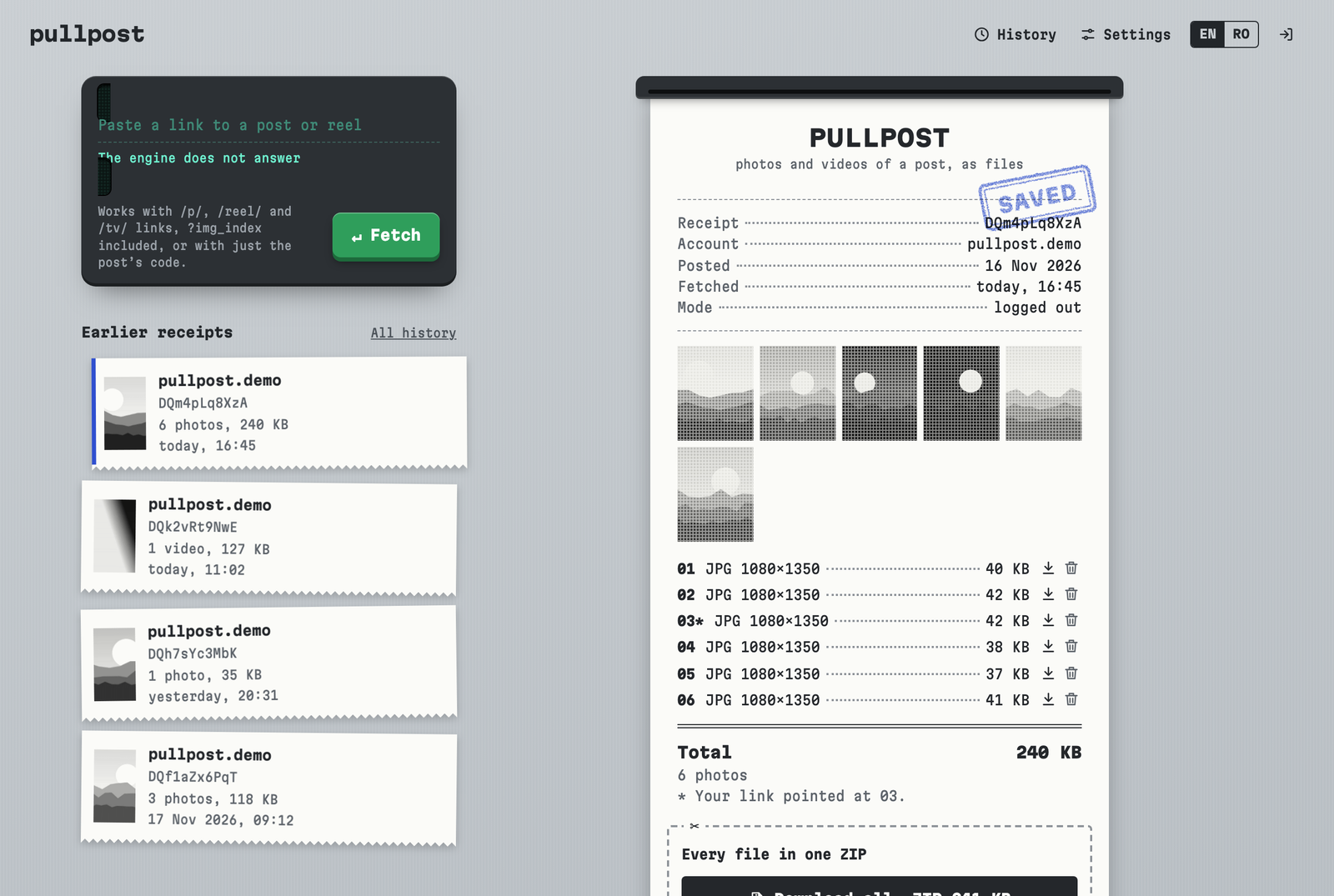
The receipt printer: one line per file, the ZIP as a coupon.
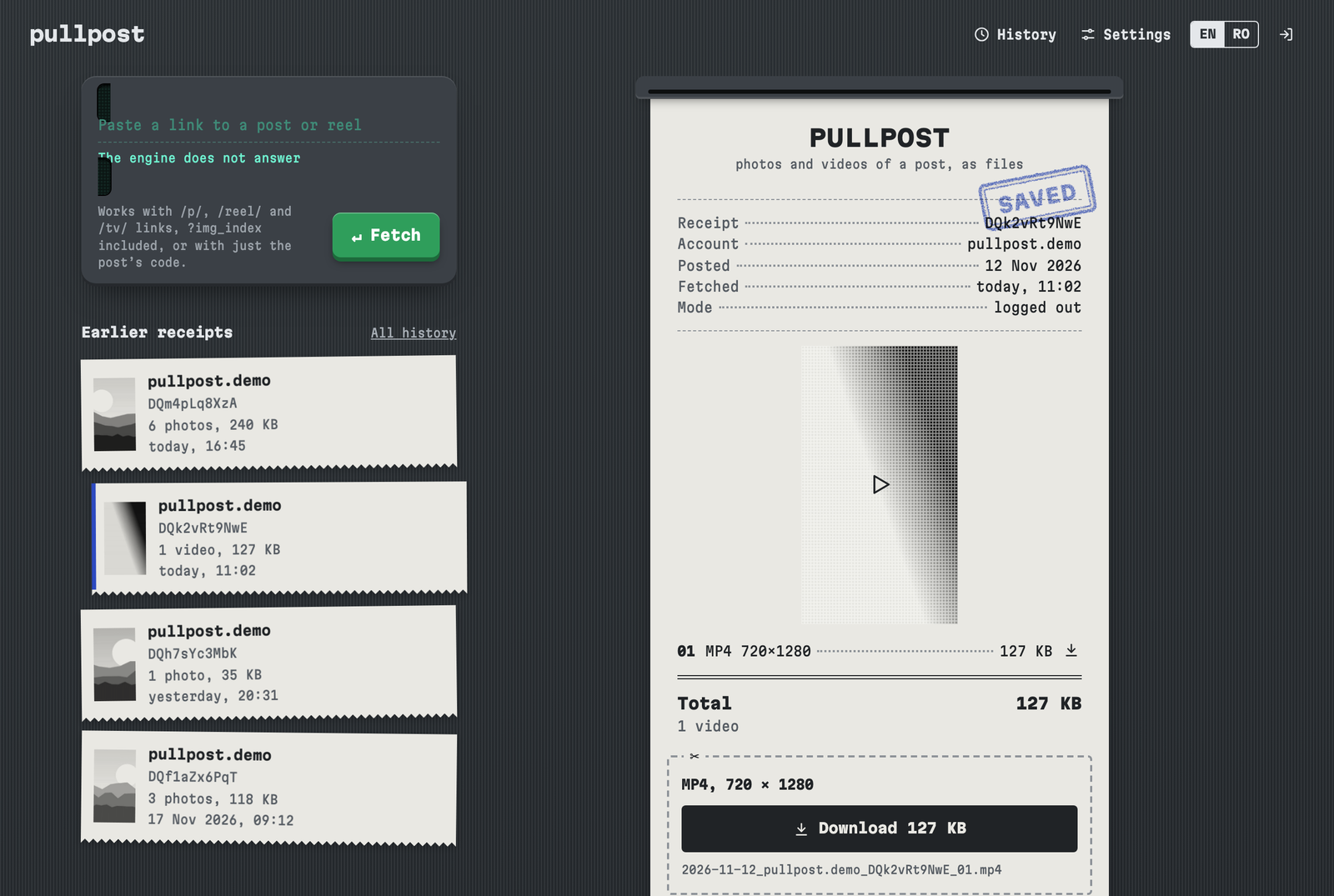
A reel, receipt look in dark mode.
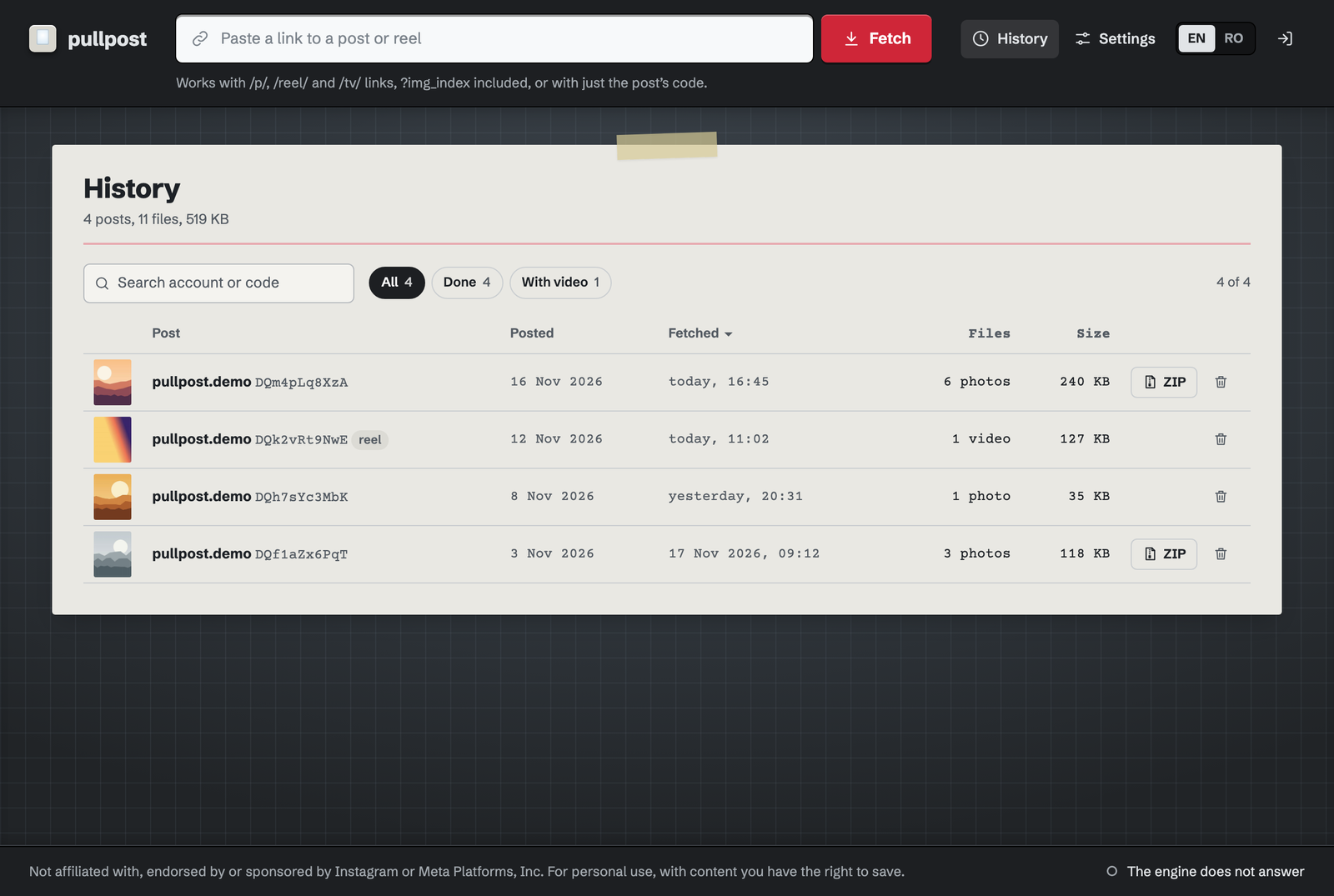
The history, light table look in dark mode. The pictures and the video are synthetic landscapes and gradients made for these shots, under a made-up account; no real Instagram post appears here.
What is pullpost?
You paste the address of a post, a reel or a /tv/ link. The server opens it in a
headless Chromium, logged out, reads the post's data from the page and downloads every photo
and video from Instagram's CDN, choosing the largest version of each. You get each file on its
own and one ZIP with all of them, and the post stays in your history until you delete it.
File names start with the date of the post, so they sort by date in a folder:
2026-11-18_<account>_<code>_01.jpg.
Try the demo
The demo runs the code from GitHub with its demo switch on. Everything works except
fetching from Instagram: open the saved posts, download the files and the ZIPs, delete
things, change the look and the language. It goes back to how it started every hour.
The posts in it are public posts of NASA's Instagram account, saved with pullpost; NASA
has nothing to do with this project.
Password: pullpost ·
open the demo
Features
- Every file of a postEach image of a carousel and each video of a reel, at the largest size Instagram serves.
- Files and a ZIPDownload one file or all of them; delete a single file and the ZIP is made again without it.
- Names that sort by dateThe date of the post first, then the account, the post code and the file number.
- History until you delete itEvery post you saved, with small pictures, dates and sizes.
- Live progressOne post at a time; the page follows the download as it happens.
- Two looksA light table with slides, or a receipt printer. Both follow your system's light or dark setting.
- English and RomanianPicked from the browser, switchable on every page.
- Your server, your filesNo telemetry, no update checks, no third-party fonts or scripts. The app talks only to Instagram.
How it works
Two containers share one data volume. web is PHP 8.3 with Apache and
SQLite: the pages, the history, the files and the ZIPs. engine is Python
(standard library only) with Debian's Chromium, driven over the DevTools protocol on a pipe,
so no debugging port is opened. Media is downloaded only from Instagram's CDN hosts; any other
address, or a redirect elsewhere, is refused.
The engine has no port of its own on the host: only the web container reaches it. Chromium
runs in a container with no capabilities, no new privileges and a memory cap.
Install
- You need Docker with Compose v2. Clone the repository and start it:
git clone https://github.com/cremenescu/pullpost.git
cd pullpost
docker compose up -d --build
- Read the setup code from the log:
docker compose logs web
- Open
http://<this machine>:8080, enter the code, choose the password for the page and confirm you have read the notice. The code proves the server is yours and is deleted once the password is set.
Behind a reverse proxy. The app has its own password, but it is meant for a home network or for a proxy that adds HTTPS, not for a port open to the internet. The
README lists the settings for that, the port and the time zone used in file names.
Your Instagram account (optional)
Logged out, pullpost sees only what anyone sees without an account. For posts that Instagram
shows only to a signed-in user you can paste the sessionid cookie of your own
account in Settings; the engine still tries every post logged out first. That is automated
access while logged in, which Instagram's terms forbid: Instagram may ask for checks, limit or
disable that account, and the cookie is a full login to it.
Responsible use
- For personal use. The photos and videos belong to their authors. Keep only what you have the right to keep, and do not republish what you download.
- Instagram's Terms of Use forbid collecting content by automated means without Instagram's permission. Using this tool may breach those terms, and that is your responsibility.
- Logged out, the tool sees only public content. In Meta Platforms v. Bright Data (N.D. Cal., January 2024) the court held that Meta's terms did not prohibit logged-off scraping of publicly available data; it decided nothing about logged-in scraping. This is not legal advice.
- Similar tools, such as instaloader, gallery-dl and yt-dlp, have been public and maintained for years.
- Instagram changes its pages without notice. The tool can stop working at any time and comes with no warranty.
What's not yet there
- Prebuilt Docker images: they are built on your machine at install.
- The engine as a command-line tool on its own, outside the app.
License & credits
pullpost is released under GPL-2.0-or-later.
The fonts it ships (Schibsted Grotesk, Courier Prime, Martian Mono) are under the SIL Open Font License 1.1.
Not affiliated with, endorsed by or sponsored by Instagram or Meta Platforms, Inc. "Instagram" is a
trademark of Meta Platforms, Inc. and appears here only to say what the tool works with.
Changelog
From the GitHub releases, newest first.
v0.1.1
· 2026-11-19
The viewer.
- A viewer over the page: a photo or video of a post opens over the history, not in a new window, with the download button above it.
- The whole post: the arrows, the left and right keys or a swipe on a phone go to the previous and next file of the same post.
v0.1.0
· 2026-11-19
The first release.
- Every file of a post: each photo of a carousel and each video of a reel, at the highest resolution Instagram serves, as separate files and one ZIP, with names that sort by date.
- Docker Compose: a PHP web app and an engine with headless Chromium, which publishes no port of its own.
- Two looks and two languages: a light table or a receipt printer, each light or dark; English and Romanian.
- A demo mode:
PULLPOST_DEMO=1, without fetching, which runs the demo linked from this page.